September 19, 2026


almost 200 dolls?! ♡ I have something for you~

Dear dollies, ♡

Okay, I genuinely don't know how this happened, but I feel like I blinked and suddenly we're almost at 200 dolls?! What??

When I started this blog, I really didn't expect much from it. I was honestly just bored and wanted to make something that felt very me - pink, girly, nostalgic, dolly and just a space where I could do whatever I wanted.

I think part of the reason I love blogging so much is that at least on the internet there's a space where I can have my own little pink Barbie world and can actually create the aesthetic I have in my head.

So seeing that almost 200 people have found my blog and actually enjoy being here after only about a month is kind of crazy to me. I'm genuinely so grateful. <333

And because I thought it would be fun to do something a little more interactive with all of you, I have a few ideas:

♡ styling my followers

I've been wanting to do a “styling my followers” post for a while! ୨୧

If you'd like to participate, just send me something through my Q&A form and tell me what kind of aesthetic you like. You can describe it yourself, send me your Pinterest, link your blog, or honestly give me anything I can use as inspiration.

Just add “styling” somewhere in your message so I know you'd like to be included. 

Then I'll put together a little outfit / aesthetic / styling based on what you've given me. I'm excited to see what aesthetics my dolls have! 
September 09, 2026

a dolly 2000's autumn guide ♡

Dear dollies, ♡

It's officially time to welcome my favorite season. ~

There's something about autumn that feels especially magical when you romanticize it a little. The cooler mornings, knitted sweaters, warm drinks, golden leaves, cozy cafés, baking something sweet... it really is the perfect season for living out your own little 2000s romcom.

So I put together my little dolly 2000's autumn guide with all the things that make autumn feel extra cozy, nostalgic and feminine to me. ♡

♡ the big three

If you want to create the perfect autumn atmosphere, I truly believe you only need three things:

scented candles, coffee & lip gloss.

That's it. That's the formula. ୨୧

Light a candle, make yourself a warm drink, put on some music and add a little gloss - instantly gets you in the perfect mood.

♡ Shows in Rotation ♡

A cute little gadget to display the shows you're currently watching! 🎀 Add your favorite shows, a poster, and a little note about what you're watching. The gadget also lets visitors switch between your shows and automatically rotates through them. ♡

♡ shows in rotation ♡
your show poster ♡
Your Show Title
your little note about the show ♡
♡   1 / 3   ♡
✧ preview ✧

♡ QUICK TUTORIAL ♡

01. add the gadget to your blog ♡

Copy the entire code below and paste it into a Blogger HTML/JavaScript gadget.

Go to:

Blogger → Layout → Add a Gadget → HTML/JavaScript

Paste the code into the content box, save it and place the gadget wherever you'd like it to appear. 🎀


02. add your show information ♡

Inside the code, find:

title: "PASTE YOUR SHOW TITLE HERE"

Replace it with the name of your show.

Then find:

image: "PASTE YOUR POSTER IMAGE URL HERE"

Replace it with the direct URL of your poster image.

Finally, find:

note: "PASTE YOUR NOTE HERE"

This is the little text that will appear underneath the show title. ♡


03. add more shows ♡

The code already contains three example show sections.

Replace the information in each section with your own shows.

Want to add another one?

Simply copy one of the existing sections and paste it underneath.

Make sure there is a comma between each show section, like this:

},

{
  title: "PASTE YOUR SHOW TITLE HERE",
  image: "PASTE YOUR POSTER IMAGE URL HERE",
  note: "PASTE YOUR NOTE HERE"
}


04. get your poster image URL ♡

You need a direct image URL for your poster.

You can upload your image to an image hosting website and copy the direct image link.

Then paste it here:

image: "PASTE YOUR POSTER IMAGE URL HERE"

Make sure you're using the image URL and not the URL of the webpage containing the image. 🎀


05. change the rotation speed ♡

The gadget automatically changes to the next show every 8 seconds.

To change this, find:

setInterval(nextShow, 8000);

The number is in milliseconds.

For example:

5000 = 5 seconds
8000 = 8 seconds
10000 = 10 seconds


06. that's it! ♡

Click the hearts to move backwards or forwards through your shows.

The gadget will also automatically rotate through them for you. ♡

♡ by Sugar Kissed Letters ♡
Please don't repost, redistribute, or claim this code as your own. ♡

August 31, 2026

q&a monday ♡

Dear dollies, ♡

It's finally Q&A day!! ⊹ ࣪ ˖ I got some really cute questions, so let's get into them ~

“What about your gadgets?”

I've received quite a few questions about my gadgets, and I have good news for you! 

Yesterday I finally added a new “blog codes” page where I've shared some of my most requested gadgets for you to use on your own blogs. <3

I'll probably keep adding more over time, so definitely have a look if you're interested in giving your blog a little makeover. ~

from DivaMel: “How long did this blog take you?”

I actually started this blog exactly 4 weeks ago, on August 3rd! I wouldn't say I'm completely finished with it yet because there are still SO many things I want to add and change, but I officially debuted it on August 15th. So honestly... not that long!

Although, you also have to consider that I was sitting in front of my laptop working on this blog basically hourly and daily haha. I've spent a lot of time tweaking little details, learning HTML and CSS and figuring out exactly how I wanted everything to look. 𝜗𝜚

♡ ONLINE GAME PAGE ♡

Want to add a little online game to your blog (like my playroom)? ♡ This creates a cute full-page game window that you can customize with any game that allows embedding.

♡ QUICK TUTORIAL ♡
01. find an online game ♡
Find an online game you'd like to add to your page. The game needs to allow itself to be embedded on other websites.

02. find the game's embed link ♡
Some game websites provide an Embed option or an iframe code. If they provide an iframe, look for the src link inside it.

It will look something like:
https://example.com/your-game
03. replace the game link ♡
In the code below, find:
src="PASTE YOUR GAME LINK HERE"
Replace the placeholder with the URL of your chosen game.

04. add it to a page ♡
Create a new Blogger Page, switch to HTML view, and paste the entire code there.

05. that's it! ♡
Save and publish your page! Your game should appear inside the cute little game window. 🎀
♡ CODE ♡
♡ click the code box to select the code ♡
✧ make sure the game website allows iframe embedding ✧

♡ Poll Of The Month ♡

A cute little poll you can add to your blog! ♡ Let your visitors vote on a question of your choice.

♡ QUICK TUTORIAL ♡
01. create your poll ♡
Go to EasyPolls and create your own poll with your question and answer choices.

02. get your poll code ♡
After creating your poll, EasyPolls will give you an embed code. You will need the poll ID from this code.

03. add your poll ID ♡
In the code below, find:
data-id="YOUR-POLL-ID-HERE"
Replace YOUR-POLL-ID-HERE with the ID of your own poll.

You can also change the data-width and data-height if you'd like your poll to be smaller or larger.

04. that's it! ♡
Paste the finished code into an HTML/JavaScript gadget on your Blogger layout and your poll should appear on your blog! 🎀
♡ CODE ♡
♡ click the code box to select the code ♡
✧ please keep the EasyPolls backlink if required by the service ✧

♡ Blog Update Notification ♡

A cute little notification button for your blog! Click the image to open a small window with your latest updates.

You can customize the image, title, update dates and messages however you'd like. 🎀

Blog update notification preview
✧ preview ✧

♡ QUICK TUTORIAL ♡

01. choose your notification image ♡

Find:
src="PASTE YOUR NOTIFICATION IMAGE LINK HERE"

Replace it with the direct image link of your choice.

You can use a GIF, PNG or any other image you'd like! 🎀


02. customize your updates ♡

Find the section containing:
YOUR DATE HERE
and
YOUR UPDATE HERE

Replace these with your own dates and blog updates.

You can add as many updates as you'd like by copying one of the existing .update sections.


03. customize the title ♡

Find:
♡ YOUR TITLE HERE ♡

Replace it with whatever you'd like your update window to say.


04. that's it! ♡

Add the code to your blog and click your notification image to open your latest updates! 🎀

♡ by Sugar Kissed Letters ♡
Please don't repost, redistribute, or claim this code as your own. ♡

♡ Mouse Skin + Star Trail ♡

A little something for anyone who has asked about my mouse cursor and the sparkles that follow it! ♡

The cursor skin itself isn't mine — I got it from Cursors-4U, where you can choose from lots of different cute cursor designs.

The little pink star/glitter trail, however, is the code I use on my blog. 🎀

✧ move your mouse around to see the trail ✧

♡ QUICK TUTORIAL ♡

01. choose your mouse skin ♡

Go to Cursors-4U and browse their cursor collection until you find one you like.

Once you've chosen your cursor, follow the instructions provided on the cursor's page to add it to your Blogger blog.

02. add the star trail ♡

Copy the code below and paste it into:

Blogger → Theme → Edit HTML

Place it near the top of your theme, inside the <head> section, preferably just before </head>.

♡ want different colors? ♡

You can change the colors of the stars by editing the hex codes inside:
const glitterColors = [ ... ];

Replace the hex codes with any colors you'd like!
♡ star trail by Sugar Kissed Letters ♡
please don't repost, redistribute, or claim the star trail code as your own. ♡

♡ Fun Fact Gadget ♡

A cute little gadget that shows a different fun fact every time you click the image! ♡
You can use any character, doll, plushie or picture you like. 🎀

Fun Fact Widget preview
♡ preview ♡
♡ by Sugar Kissed Letters ♡

♡ QUICK TUTORIAL ♡

01. choose your image ♡

Find:
src="PASTE YOUR IMAGE LINK HERE"

Replace it with the direct image link of whatever you want to use!

This can be a character, plushie, photo, PNG, GIF or anything else you like. 🎀


02. add your own fun facts ♡

Find:
var funFacts = [

Replace "Your own fun fact ♡" with your own facts.

Keep each fact inside quotation marks and separate each one with a comma.

You can also use:
<br>
to create a line break inside a fact.


03. that's it! ♡

Save the code and add it to your blog. Clicking your image will show a different fun fact each time! 🎀

♡ have fun decorating your blog! ♡

♡ Q&A Gadget ♡

A cute little Q&A for your blog! ♡
Click the icon to open your question form in a little popup.

Q&A preview
♡ preview ♡
♡ by Sugar Kissed Letters ♡

♡ QUICK TUTORIAL ♡

01. choose your Q&A image ♡

Find:
src="PASTE YOUR Q&A ICON IMAGE LINK HERE"

Replace it with the direct image/GIF link of your own Q&A icon.


02. add your Google Form ♡

Create your own Google Form and make sure people can submit questions.

Then find:
src="PASTE YOUR GOOGLE FORM EMBED LINK HERE"

Replace it with your Google Form's embed link.

In Google Forms, click Send → <> Embed HTML and use the URL from the iframe.


03. that's it! ♡

Save the code and add it to your blog. Clicking your image will open your Q&A form inside a cute popup window. 🎀

♡ have fun decorating your blog! ♡

♡ Music Player ♡

A cute little clickable music player for your blog! ♡
Click the iPod (or your chosen icon) to play or pause your song. 🎀

iPod Music Player preview
♡ preview ♡
♡ by Sugar Kissed Letters ♡

♡ QUICK TUTORIAL ♡

01. choose your music player ♡

Find this part of the code:
src="PASTE YOUR MUSIC PLAYER IMAGE LINK HERE"

Replace it with the direct link to your desired GIF or PNG.


02. choose your song ♡

Find:
src="PASTE YOUR YOUTUBE EMBED LINK HERE"

Go to the YouTube video you want to use, click Share → Embed, and copy the video ID from the YouTube embed URL.

Then use it in this format:
https://www.youtube.com/embed/XXXXXXXXXXX?enablejsapi=1&origin=YOUR-BLOG-URL-HERE

Replace YOUR-BLOG-URL-HERE with the URL of your own blog. ♡

Make sure you keep ?enablejsapi=1&origin=YOUR-BLOG-URL-HERE at the end of the link.


03. add the widget to your blog ♡

Go to Blogger → Layout → Add a Gadget → HTML/JavaScript and paste the entire music player code into the content box.

You can place the gadget in whichever section you'd like. I have mine in “footer-2-2”. 🎀


04. that's it! ♡

Save your gadget and click your music player to play or pause your chosen song. 🎀

♡ have fun decorating your blog! ♡

August 25, 2026


a little update ♡

Dear dollies, ♡

Just a little update because I have a few things I wanted to share with you! ~

First of all, I see your Q&As! ♡ I haven't forgotten about them, I just want to collect a few more questions before answering them. Once there are enough, I'll make a little Q&A post and I'm thinking of posting the answers every Monday - as long as there are enough questions, of course! So if you've been thinking about sending me one, this is your sign. 🎀

I also haven't forgotten about all the request for my HTMLs & gadgets! I'll be posting those sometime this weekend for anyone who wants to use them or have a little look behind the scenes of the blog. ♡

And lastly... I just want to say thank you so, so much to all my dolls who have been following my blog. I genuinely can't believe we're already at 47 dolls!!! <33 It makes me so happy to see people actually enjoying this little corner of the internet that I've been putting so much love into.

I already have SO many ideas for future posts, and I can't wait for the weekend to have some proper time for the blog again. I definitely want to decorate it some more, add a few new things and keep making it feel more and more like my own little space. ~

Thank you for being here, dollies. ♡

xoxo,
Lisa

August 24, 2026


moments from last week ♡

Dear dollies, ♡

It's been a little while since my last post! If I didn't restrain myself, there would probably be a new post every single day - and knowing me, I'd run out of things to talk about within a week and burn myself out. So please bear with me while I'm still figuring out the right rhythm for this little blog. ~

For now, I thought I'd share a few little moments from my last week, specifically August 20th–23rd.

♡ thursday

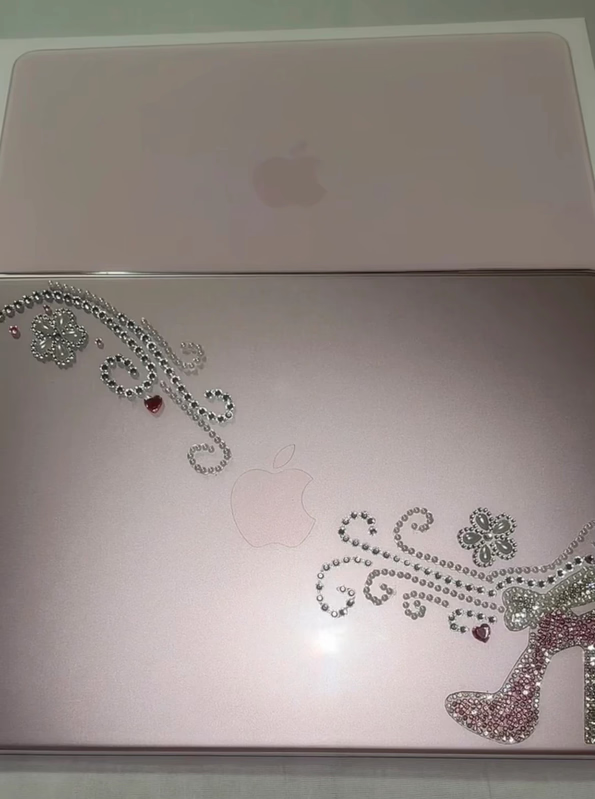
My MacBook finally arrived!!! And oh my god, it is so so cute. Of course, I couldn't just leave it alone, so I bedazzled the case on the very same day.

I'm not completely satisfied with how it turned out, though, so I think I'll probably redo it at some point. But the heel??? So cunty. I absolutely love it haha.

Now I just have to figure out how to actually use a MacBook because currently I feel like a grandma trying to understand technology TT It's so different from my Acer laptop and I keep instinctively trying to do things the way I used to. I'm sure I'll get used to it eventually, though!

August 18, 2026


my ideal morning routine ♡

Dear dollies, ♡

I’m definitely someone who needs a little structure in the morning. If I wake up and don't have some sort of routine to follow, I can very easily end up lazing around for the rest of the day ><

Of course, my mornings don't always look like this. But on the days when I feel especially productive and want to start my day on the right foot, this is pretty much my ideal morning routine.

♡ 2000s music & stretching

The first thing I do is put on my 2000s morning routine playlist [♡ ♪ 2000s morning routine ♡]. I need some good music playing while I get ready for the day, and this particular playlist puts me straight into that main-character-in-a-2000s-romcom mood.

I usually start with a little 5–10 minute stretch. Nothing too intense - just enough to wake my body up after sleeping and get myself moving.

After that, I brush my teeth and make my way to the kitchen, because breakfast is probably my favourite part of the morning. ♡